Welcome to the Network.
If you are watching the live stream right now, you are interacting with BaconSuite—a custom-built, modular broadcasting engine designed to make chat fully interactive.
 Kick
Kick
Tinko Mini-Game
Tinko is an interactive physics drop game that runs directly on the stream overlay. You earn balls passively just by hanging out in chat, which you can drop to win multipliers, challenge other viewers to duels, or enter Battle Royales.
The Live Grid
The stream features a dynamic, multi-cell viewing grid. Viewers can use chat commands to queue up videos, focus on specific cells, and interact with the content being shown in real-time.
Free Overlay Tools
Browser-based widgets for OBS. No downloads required.
Bouncing Watermark
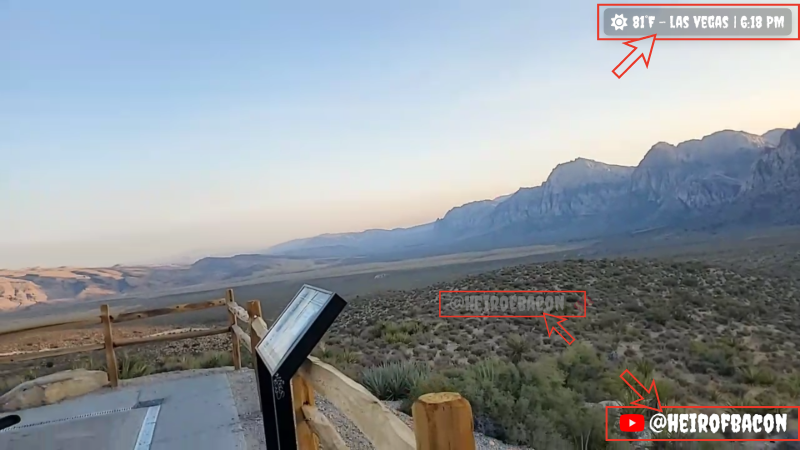
A retro DVD-style bouncing logo or text overlay for your stream.
Socials Rotator
Sleek, animated rotating social media handles and icons.
Live Weather
Real-time local weather updates and a stream clock widget.
Gorillas in the Chat
Play a modernized version of the classic 1991 artillery game right in your browser.
Custom Commissions Open
Need something bespoke? I take commissions for custom stream tools, specialized OBS overlays, and interactive chat games designed exactly to your brand.
Stream Commands
Everything you need to interact with the Tinko game and the Live Grid.
Tinko Commands (Viewers)
Drop balls onto the pegboard. You can optionally specify a color, "me" to drop your profile picture, or "@username" to drop someone else's avatar.
Ex: !drop 5 me
Check your current ball inventory. Tag someone else to check their balance.
Ex: !balls @heirofbacon
Permanently change what your balls look like. Use "me" to always drop your profile pic. (twitch only, kick requires your username)
Ex: !color #ff00ff
Shows the top 3 players on the server, as well as your current rank.
Challenge another viewer to a 1v1 drop battle. Winner takes the whole pot!
Accept or decline a pending duel challenge from another viewer.
Join an active Battle Royale lobby if a Moderator has opened one.
Spams the chat with a quick help guide explaining the game.
Live Grid Commands (Viewers)
Pulls a specific grid cell into the main viewing area. You can also just type an exclamation point and the number.
Ex: !3
Suggest a YouTube, Kick, or X.com link to be added to the live grid. Requires moderator approval to be shown.
Forces a cell to reload if the stream or video has frozen/buffered.
Moderator & Admin Commands
These commands require Mod or Broadcaster privileges to execute.
Opens a Battle Royale lobby for 60 seconds. Viewers type !join to enter. Winner takes all.
Pauses or resumes the Tinko game completely.
Injects currency into a specific user's account.
Removes currency. Use "all" to wipe an account to 0.
Sets the global limit for how many balls a viewer can drop in a single command to prevent lag.
Instantly overwrites a grid cell with a new video/stream link.
Toggles the visibility or audio of a specific grid cell.
Swaps the positions of two active feeds on the grid.
Welcome to the Toolkit
A collection of highly customizable, browser-based overlays for your live streams. Completely free, no accounts, no installations, and no server required.
How It Works
Unlike traditional overlays that require background software, these tools generate a customized URL string. All of your settings, colors, and text are saved directly inside that link.
- Select a tool from the sidebar.
- Tweak the settings, fonts, and colors to match your brand.
- Click the COPY button below the live preview.
- In OBS (or your streaming software), add a new Browser Source.
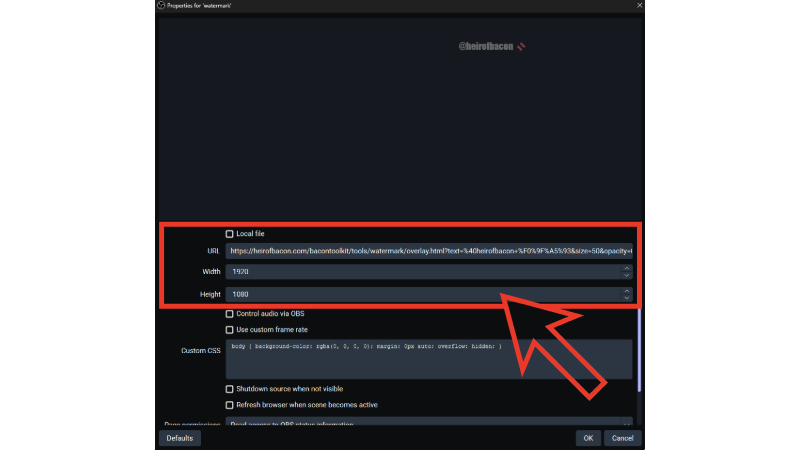
- Paste the URL, set the Width/Height to match your canvas (e.g., 1920x1080), and press OK.
Launch a Tool
Custom Google Fonts
Every tool in this kit supports dynamic Google Fonts. Instead of picking from a limited dropdown, you can type the exact name of any font available on Google's library into the "Font Family" box (e.g., Bebas Neue, Roboto, Anton, Creepster). The overlay will automatically download and apply the font in real-time.
Making Future Edits
Because your settings are saved in the URL, if you want to make a change later (like updating a social handle or changing a color), you don't need to recreate the overlay from scratch.
Load Existing Settings: Simply paste your old generated URL back into the URL box at the bottom of any tool. The editor will instantly reverse-engineer the link and restore all of your colors, fonts, and settings so you can continue exactly where you left off!
BaconSuite Core
A modular, locally-hosted streaming engine that unifies interactions across Twitch, Kick, YouTube, Nightbot, and OBS. Designed entirely on Node.js and Socket.IO.
Core Connections Locked
The files providing working connections for Twitch, Kick, YouTube, Nightbot, and OBS are LOCKED. They function flawlessly as intended and do not need to be changed or modified when adding new modules. If modifications to these core files are absolutely necessary, they require review before proceeding. Interface with them strictly via their exposed Socket.IO events.
Boot Process
Environment Setup
Navigate to baconsuite-core/engines/. Ensure the .env file is fully populated with your platform API keys and OBS credentials. Or you can simply run the setup wizard after you boot the suite.
Install Dependencies
Open a terminal in the root directory and run npm install. Or run the install.bat script. This generates your node modules.
Boot the Suite
Run the provided start.bat script. Access your main command center at http://localhost:3000/admin.
Module: Grid 2.0
Grid 2.0 is an interactive, highly dynamic media grid allowing streamers to display URLs, images, and videos dynamically on-screen across up to 8 independent cells.
Add http://localhost:3000/modules/grid2.0/viewer.html as an OBS Browser Source for the live, transparent output.
Append ?mode=dock to the control panel URL. This strips away extra UI padding to fit inside a slim OBS custom dock.
Module: OBS Control
Connects directly to OBS Studio via WebSocket (Tools -> WebSocket Server Settings). Ensure port 4455 is open and provide your password in the BaconSuite Admin Dashboard.
- Live Preview: Fetches low-latency JPEG frames of your current scene using
GetSourceScreenshot. - Scene Switching: Fetches all available scenes and creates clickable buttons to transition instantly.
- Source Toggling: Dynamically extracts items in your active scene to toggle visibility.
Developer Guide
To create a new module, create a new folder in /modules/. The core index.js automatically scans this directory on boot.
constructor({ app, io, chatEngine, vault }) {
this.app = app;
this.io = io;
this.vault = vault;
}
init() {
console.log('[Module: Custom] Initializing...');
this.io.on('connection', (socket) => {
// Handle logic here
});
}
}
Tinko Leaderboard
The top ball droppers across all platforms.
Tinko Pokedex
Discovered avatars and dropped entities.